
Gallery - Photo Gallery, Album - Google Play
You'll be able to see results in few seconds.
Publisher Description


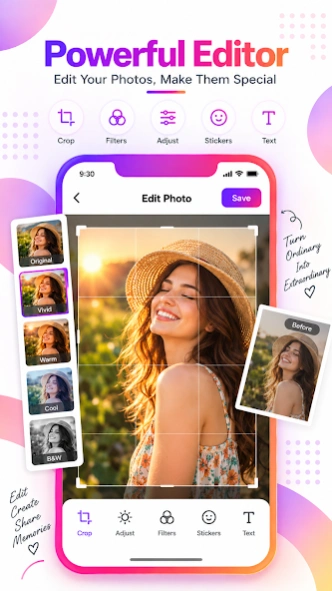
All in one app with Photos & Videos management and Photo Editing with all tools.
Awesome Gallery is designed for managing your photos,videos and albums.Gallery is one of the fastest app for viewing an HD photos,search photos, videos and managing albums.
3D Gallery provide you best photo viewer to view your photos easily.
Photo Manager the gallery view has all of your photos and videos in one slick gallery view and photo viewer, photo gallery with smooth user interface.
Photo Gallery with slideshow effect like Default,Alpha Rotate,3D,Blur photo,Increase contrast ,Brightness photo and other many operation perform by gallery pro.
Photo Manager easily manager or arrange your photo by categories(All, Photos, Videos), sort photos by name and date and also by ascending/descending order. HD Photo Gallery also manager photo grid size, you can change the grid size of gallery.
Photo Gallery HD makes you move or copy or be able to separate to the folder some photos,images and movies,from Organize Gallery.
Gallery Pro app to manage your albums of photos and videos with Simple, beautiful and Attractive user interface.It has very simple look made with google material design which is more flexible with multilevel scrolling.
Gallery Pro smooth user experience is optimized for large screens and multiple finger gestures.
Photos & Gallery is an easy way to privately collect all your HD photo or video
Access all your photos and videos from one Gallery
Photos & Videos will be organized automatically
Automatically organize all of your photos and videos according to your events,date,time and location into albums.
See recent photos and videos in timeline view
You will have a quick access to your recently viewed items based on time and date you opened it.
Also differentiate your favorite photos just by a single click and view all favorite items in separated screen.
Smooth and very flexible full screen photo view
Organize gallery gives you very smooth and lovely full photo view it contains smooth zooming, slide show, item information and many more.
Just Drag down your finger from full photo view to exit from full screen image.
Photo Editor Photo effects , crop, saturation, contrast Rotate etc.
Hide Photos,Video Hide Hide photos & video from your organize gallery and access them easily using a secret PIN code.
Gallery Lock hide pictures and videos and it is an gallery locker that is absolutely needed for protection of personal privacy of gallery lock apps download. Gallery Vault can hide its app images and keep your privacy absolutely safe. Hide Picture and Hide Video app to protect your privacy!
Other features
- Selfie Camera photo albums.
- Able Grid Photo view.
- Edit gallery pics.
- fast scroll
- Move files,delete, copy & paste.
- Multiple file selections available.
- Sort by, Name, date, Ascending, size, type, Descending etc.
- real-time photos, videos and albums updated counts
- Share photos to social networks.
- Protect app my password and fingerprint
- Hide photo, Albums, videos
- Hide Secret photo.
HD Photo Gallery Best Gallery video player, Gallery Lock for security & Make your gallery photos alive with 3D styles,Organize Gallery is the fastest app for viewing HD photos, search photos and managing albums. Gallery Pro smooth user experience is optimized for large screens and modern gallery with special animated gallery looks for your phone.
About Gallery - Photo Gallery, Album
The company that develops Gallery - Photo Gallery, Album is Awesome Gallery. The latest version released by its developer is 1.0.
To install Gallery - Photo Gallery, Album on your Android device, just click the green Continue To App button above to start the installation process. The app is listed on our website since 2026-08-27 and was downloaded 0 times. We have already checked if the download link is safe, however for your own protection we recommend that you scan the downloaded app with your antivirus. Your antivirus may detect the Gallery - Photo Gallery, Album as malware if the download link to com.awesomegallery is broken.
How to install Gallery - Photo Gallery, Album on your Android device:
- Click on the Continue To App button on our website. This will redirect you to Google Play.
- Once the Gallery - Photo Gallery, Album is shown in the Google Play listing of your Android device, you can start its download and installation. Tap on the Install button located below the search bar and to the right of the app icon.
- A pop-up window with the permissions required by Gallery - Photo Gallery, Album will be shown. Click on Accept to continue the process.
- Gallery - Photo Gallery, Album will be downloaded onto your device, displaying a progress. Once the download completes, the installation will start and you'll get a notification after the installation is finished.
Program Details
System requirements
Download information
Pricing
Version History
version
posted on 2026-08-27
version 3.8
posted on 2023-05-30
- Fixed WhatsApp Status issues.
- Enhanced performance.
- App is now more stable.
version 3.0
posted on 2020-02-11
-- Added feature to download statuses.
-- Fixed series of bugs.
version 2.9
posted on 2020-01-15
- Now you can remove ads.
- Improved design.
version 2.8
posted on 2020-01-09
- Fixed series of bugs.
- Made app more smoother than before.
- Enhanced albums photo & video views.
Disclaimer
Official Google Play Link
We do not host Gallery - Photo Gallery, Album on our servers. We did not scan it for viruses, adware, spyware or other type of malware. This app is hosted by Google and passed their terms and conditions to be listed there. We recommend caution when installing it.
The Google Play link for Gallery - Photo Gallery, Album is provided to you by apps112.com without any warranties, representations or guarantees of any kind, so access it at your own risk.
If you have questions regarding this particular app contact the publisher directly. For questions about the functionalities of apps112.com contact us.
